


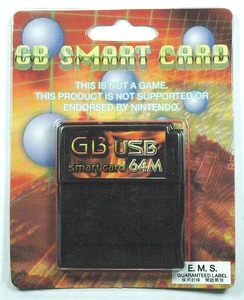
EMS is arguably the largest supplier of Classic Game Boy Flashcarts. Their little blue 32mb carts where sold publicly (and later less publicly) for a number of years before they surprised everyone with the stealth announcement of a new 64mb USB based cartridge. I ordered one curious to see how it stacked up their earlier cart and the current stock of existing carts.
The item comes in a sparse package touting its USB connectivity, LSDJ compatibility (checks in the mail Johan!), and links to download the software from their website.
The offical features are:
- Support for GB/CGB/GBA
- Supports GB/CGB ROMs (including LSDJ)
- Multiple game ROMs on the same cartridge are allowed
- Connects to PC via mini-B type USB cable
- Software supported on Windows XP (32bit), Vista (32bit), and 7 beta (32bit)
- Easily replaceable battery (for SRAM). No soldering is required
- Dual Banks
The first machine (Dell XPS 400) I tested installing the software on, the drivers simply didn’t work. Manual installation didn’t help, but later I tried it out on another windows machine (eeepc 1000h) and it worked fine. It also tested as working well on a Mac running Parallels, so those with access to an virtualized windows xp setup should be able to use the product.
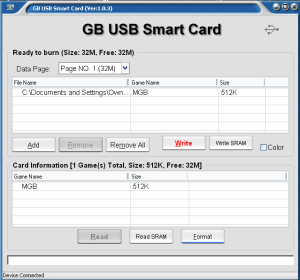
Once the drivers are installed, it is basically plug and play. The included software is pretty utilitarian, you can see whats on the cart already, and browse and drag or drop files into the top window to select which roms are added to the cart. If you add one or more roms to the box, the software will automatically create a multi-cart menu that will allow you to select your program once the game boots.
One of the oddest features on the cart is its paging feature. It does not actually support 64mb of games at once, rather you have two 32mb banks that you select by POWERCYCLING the gameboy very quickly. The catch is that these two banks share the on-board 128kb sram, so if any of the other programs require use of sram, your songs will overwrite each other when you load them.
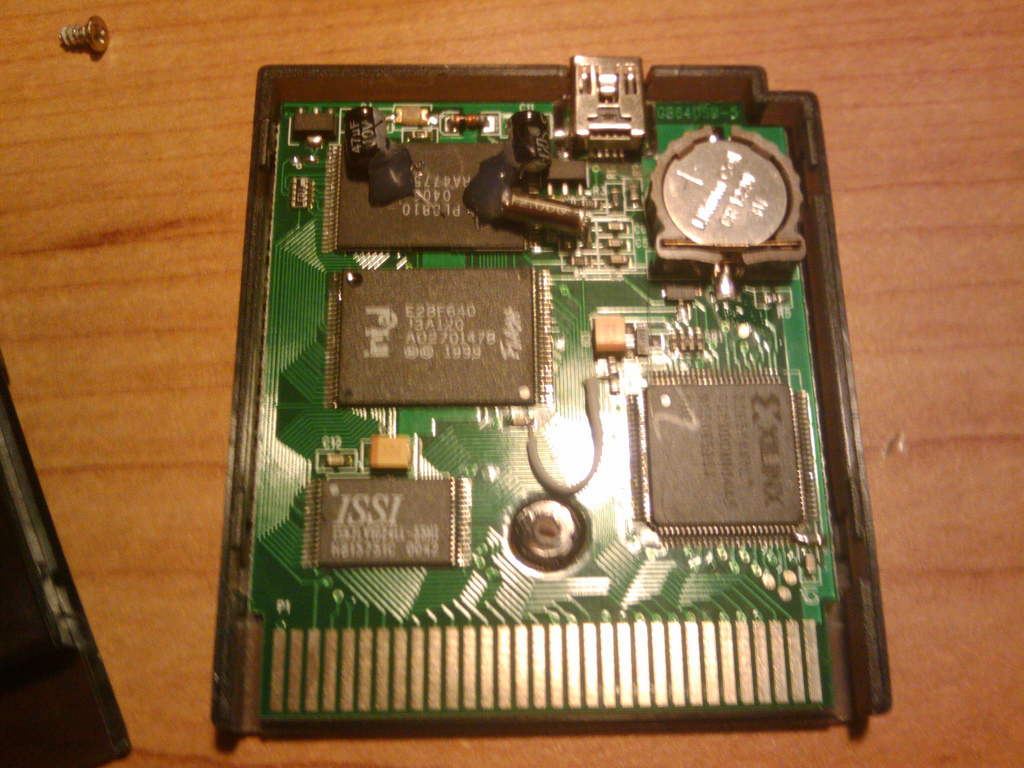
In concept the bank feature is cool. I quickly setup mGB in the main bank, and a bunch of gb sound programs that did not require sram in bank two. By default a cold started gameboy will also default to bank 1. and then a quick power toggle gets you in bank two. But when I went to try another music program, I had to powercycle twice to get back to the root menu, or wait for whatever (educated guess) capacitor discharges on the cart to let it get back to bank one. It would be nice if there was an hardware toggle on the cart so I can do a less scary method of trying the different modes on the cart. By the way, you HAVE to use bank two. It is not smart enough to realize that if its blank to ignore the toggle feature, and will load a blank screen if you power cycle.
Other quick notes:
- The cart itself is pretty cheap plastic. They include the measurements of the USB port in the manual for what I assume is a tip for people who want to use a commercial cart to house the unit.
- You cannot load the cart on USB if it is plugged into a Game Boy. Seems odd with that usb jack right on top.
- User replaceable battery is an excellent idea.
- When booting LSDJ I saw a quick flash of code on the screen. Maybe its the carts firmware? Sometimes power cycling would corrupt my LSDJ worksram, but this only seemed to happen when:
- Loading the Pixelh8 software, which DOES NOT work on the cart. Oh well
Haven’t had a chance to try it out on the long term, so will post updates if it starts to act up, but its a good enough option for users who want a cart quickly that simply works. The LSDJ and bank modes issues are troubling, so my gut tells me that if you own a product like the BleepBloop cart already stick with that, at least until more user feedback comes in.
Purchase: kitsch-bent — USB 64M Smart Card.
Thanks for the review. I think I may have to upgrade at some point.
it seems much more future proof than the old ems32 gor sure. As long as you have a vm and usb port, you should be able to run the software for this.
Peter, it says it’s GBA compatible. Can you use M4G with it?
It only “Supports GB/CGB ROMs (including LSDJ)”
I’m totally satisfied with these even tho I have one gameboy that doesn’t want to recognize page 1 of these carts. The ease and security of just slapping in a usb cable and using the simple software has ruined me. I’ll never use a printer port again!
Got one of these recently but didn’t have time to try it till now.
Looked around for linux drivers but none and just plugging it in.. not recognized.
Got drivers and software on win xp and no problems there.
Only tried a few ROMS … they worked fine on a GB…. then decided to see if they’d work in a Super Gameboy. Got either nothing or … glitched out goodness.
Anyone else tried this with Super Gameboy? Results?
Hi, I have a problem with this cartridge, and I’m writing in the hope that maybe someone will be able to help. My cartridge was malfunctioning from the very first time I put it in my gameboy. By this I mean that 8 times out of 10 my gameboy (I’m using an advance sp btw, not that it should be a problem since the back of the case clearly states that it’s a supported model) didn’t even recognize that I put a card inside it. By now the problem got kinda solved without any help (just by itself), and the gameboy recognizes the card 6 times out of 10. However, sometimes the game/software I use freezes, lines appear on the screen etc, and after that I have to take out the card, blow in it, put it back, but every time I do so, I lose every saved data. (Can be very, very frustrating after working with LSDJ for hours.) Before asking, no I’m not as stupid to save on the other side of the cartridge, also I don’t think that the battery is the problem, because if I don’t plug out the cartridge, I can work with it for days. (Or as long as it doesn’t freeze again.)Since they didn’t give any kind of warranty for the product, I can’t really do anything. Another problem with this card is with the software I’m supposed to use to upload things on it. For some reason all the text appears in some sort of indian(?) font for me. Yet, the very same file shows english words on my friends computer. I feel kinda ripped off, and I’m still pretty angry about the fact that using a card that gets a good review like this only makes me throw hours and hours of hard work out the window… If anyone experienced the same problem, or can help me in anyway, please do so, it will be appreciated. Thank you.
Sorry to hear your having trouble. I guess you can try on another gameboy, and try a replacement battery. If that doesn’t work you should ask to exchange the cart from whoever you bought it from. We have no affiliation with ems or any gameboy store, so good luck!
m0eb1us, you should contact the person who sold you the cartridge. i’m sure they would be glad to help.
Read that this is a comment i sent to Kitsch about compatibility and problems. and i solved some problems. i hope it help some people:
thanks. i understand the problem of gameboy color game. YOU CANT MIX gb color games and gb mono games on the same PAGE. this way i have no glitch on gb color games anymore. so i put gb mono games on page 1. and gb color games on page 2.
All Gb color games seem to work now. im happy about that.
i have 3 gb mono game that dont work , the others 27 gb mono roms work perfect. the 3 gb mono games that dont work are: Gargoyle quest (dont load), megaman 5 (dont load ) and mario land 2 ( world map dont work, you can only play stage 1) i tried several roms version of each game. If you find a WAY TO GET THESE GAMES WORKING, contact me thanks. i try to put theses games each alone on page 2 and it doesnt work.
Now i have to say you something very important. my father is a electronician technician specialist in repair video game console. You surely have some people that told you that the 64m gb cart work pretty bad on the gameboy sp. there a trick. the gb track is too loose on your cart. my father open the cart and put glue in the hole in the middle of the cart. so the track is not loose anymore. and he has to put the track a little father in the right than middle. i hope you understand my bad english LOL NOW THE CART WORK EVERYTIME 100% i try it in any game boy console. before that i had to insert the cart 5 to 20 times before getting it working in my gameboy sp. for the original gameboy your cart was working everytime. Now with the repair of my father it work the first time i insert it in any gameboy model: gba, gb sp or original gb. i dont own a gameboy color to try it.
Now im verry happy with it. if you find a way to get working any of these 3 gb mono games: gargoyle quest, mariland 2 and megaman V. i would appreciate it. otherwise i will live with it LOL
THANKS A LOT.
I have recently bought the 32m GB Smart cartridge, but can’t find an item to burn more games onto it, it came pre-burned with LSDj, but I wish to put more games on there. Any help?
You need the find the ems transferrer II. No one on TCTD sells it, but youll see things like that for sale in chipmusic.org from time to time.
i just bought this cartridge to use with lsdj and it works nearly perfect. but im having trouble with using it for extended periods of time. after about an hour and a half of use, my gameboy color powers off without warning. i try to start it back up, but it does the same thing within a couple minutes until i let it rest a few hours. ive tried multiple roms and they all do the same thing. do you know whats happening and possibly a way to solve this problem? itd be terrible for my gameboy to die in the middle of a concert lol.
My only concern with this cart is the 128kb of sram. The LSDJ manual indicates that 1MB is needed for use of the file screen.
I haven’t actually used LSDJ on any hardware yet, so I’m not sure how severe a limitation this really is.
128KB sram = 1024kb sram = 1mb sram. (Big k versus small k)
It will work fine with LSDJ.
I have a problem with this cartridge. I ordered it with LSDj and then I put some other roms on the other side. But I can’t get to it (it only worked the first time). I’m swithcing the power just like the instructions say but It won’t work. Any help?
I am little confused.
Is the Smart Card haves real 64MB (Mega Bytes) or that is 64Mb (Mega bits) ?
If 1Byte = 8bits than
64MB = 512Mb
so if the Smart Card haves 64 Mega Bytes you can put lots of Game Boy Games on it.
If an ordinary Game Boy game uses 2Mb of memory you can put (512Mb/2Mb= 256 Games)
(Monochrome Game Boy Games)
Can you tell what “64M” means (64MBytes or 64Mbits)?
its bits! So think two banks of 4 megabytes.
Ok for some reason it’s not working with my DMG-01, the nintendo mesage is just a black bar and then it stops, any idea how to fic this?
This only happens when the USb connection is linked to my computer.
I dont think you can use the cart while its hooked up to a gameboy.
How do I transfer data in this case, is there anyway for me to transfer the data into my computer?
If so how do I power the cart without it being hooked up to a gameboy?
You have to do it while the cart is detached from the gameboy.
Does E.M.S haves any plans on releasing an successor to Smart Card 64Mb where you can save all the games wich is in the cartridge (the games that haves save function) ?
It is really little bad for this 64Mbit Smart Card because saves just one game no matter how much games you have putted on the card. – you must keep your SAV files on your computer.
Oh, and doese E.M.S haves own web-page on the net?
I would like to ask him some questions.
You’d have to ask EMS. we have NO affiliation with EMS.
i cant get mine to accept the drivers it sucks i hate that it dose not work at all
I want to buy the EMS Game Boy Smart Card, but first I want to know:
Is there is a way to change the game that you are playng without changing the Power Switch OFF to ON ?
How to go to the Menu-Screen where are the Names of the Games are showned without changing the Power-Swithch?
I think that is not too good for the Game Boy if you changing the Power-Swittch everytime when you changing the Game.
Please ansswer me for this.
Thanks.
“It’s not good for gameboy to switch on to off everytime when you changing game”? So what about official games? If you want a recent console the gameboy is not for you and if you want a recent flashcard with recent features the EMS card is not for you.
I don’t mind if you must switch (OFF to ON) the Game Boy after every changed game. I’ve asked this to see if it’s like on The Nintendo’s DS and Nintendo’s 3DS Flash Card.
I love to Play this Games on the Original Game Boy with EMSs Smart Card !
Thats why I’ve ordered one EMS Flash Smart 64Mb Card from Kitsch-Bent’s Store :)
I’ve got the EMS Smart Card 64Mb from Kitsch Bent.
I’ve Instal the program GB_USB.exe and the drivers, but when I plug the Cartridge with the USB cable the program shows that it haves some kind of “Error 31” and the whole program freezes and you can’t do anything – you can’t add some Roms nor even Format the Cartridge…:(
What this “Error 31” means ?
When I’m unplug the Cartridge the Programs unfreeze.
The Cartridge is New – untouched and when I put on my Game Boy the Kitsch Bent Logo apears and then runs some kind of a PD game named “Adventure”.
Is the cartridge defective or I’m doing something wrong?
How can Kitsch Bent sells untested and defective products? I mean 42 $ is’nt that cheap to trow for an Cartridge that doesnt work.Plus is expensive to return the cartridge if you live outside North America as I do.
You should be saying all of this to Kitsch Bent. He will sort out your issues. This is a chip news blog, not tech support.
I love you.
I know this is not a support site, but I’ve sent tons of e-mails to KitschBent support, but never received a reply from them.
One last question. I know you can answer this one. Do I have to put the EMS GB USB flash cart in the GameBoy cartridge slot and then power ON the Game Boy and then plug the USB cable to the PC and start the GB_USB.exe program (with the Game Boy power still turned ON)? Or just plug the cartridge to the USB port without inserting it into the Game boy slot?
I Never tried with the GB powered on. I think it will damage the Cartridge.
Try posting on cm.org. He is pretty active and helpful there.
OK so heres my issue. I bought a gb usb smart card 64m, and i went to go and do a back up, using a virtual machine running XP, and the drivers installed no problem, but when i did a backup, it erased not only my rom, but my saves as well! how do i fix this? i am kinda pissed off cuz i took rainbowdragoneyes to dinner last night in boston, and i had NOTHING to show him… I digress… another thing, is there any way to combine .sav files? cuz i want to combine the one from my emulator with another one from an emulator. please help?
We dont provide support for this product. Sorry.
I think at this point you would be more than justified in either “locking” this post to comments or removing it completely.
But hey, I like the high search rank.
Mine seems to not work right with the rom G&W GALLERY.
Hi,
Does anybody of you know if it really works on a Game Boy Advance?
I mean, they say it´s supported, but i wolud like to hear another opinion by someone who actually really used it.
I don´t want to throw away my precious money, especially because i´m not a technician. ^^
I would be really happy, if someone could help me.
Thank you!
Greetz Irek